
New site builds are managed and launched by our Launch Teams (███████████████), afterwards, maintenance and updates get “handed over” to our Support Teams (███████████████).
When to hand a project over
Below are some key considerations for Launch TAMs to take into account when determining when to hand a project over to our Support Teams.
- When the work in the project brief is done, the site is launched and we’re not expecting or aware of any further requests from the partner.
- When the work in the project brief is mostly done but there are some minor adjustments left that are pending for one reason or another.
- Rather than have the Launch Teams continue to monitor for updates, we may decide to hand the project over to our Support Teams to wrap up the work, examples:
- ███████████████
- ███████████████
- If we are writing a SITREP and asking our Support Teams if they can take on some work, ping them (███████████████) in your SITREP to alert them.
- Rather than have the Launch Teams continue to monitor for updates, we may decide to hand the project over to our Support Teams to wrap up the work, examples:
Letting the partner know
During the post-launch process, the partner should be informed about where to turn for support (post-launch checklists). There’s a handy “Site Launch Info for Partner” Pre-def in Zendesk.
Handing sites over to Happiness
For some partners, we’re only engaged for a short period while onboarding to an Automattic product or for a site build. For these projects, we’d want to set them up for success after we have ended our engagement and should direct them to Happiness Engineers once we’ve finished. Please check out our handbook page with some considerations for these projects and partners (███████████████), and handover to Happiness Support.
How to hand a project over
Creating the Site Post
Our Support Team uses posts on our Projects P2 in a special category (███████████████) to track ongoing support/maintenance work for each of our partner sites.
Use the “New Site Post P2” pattern which includes all needed sections, where you can add the relevant information.
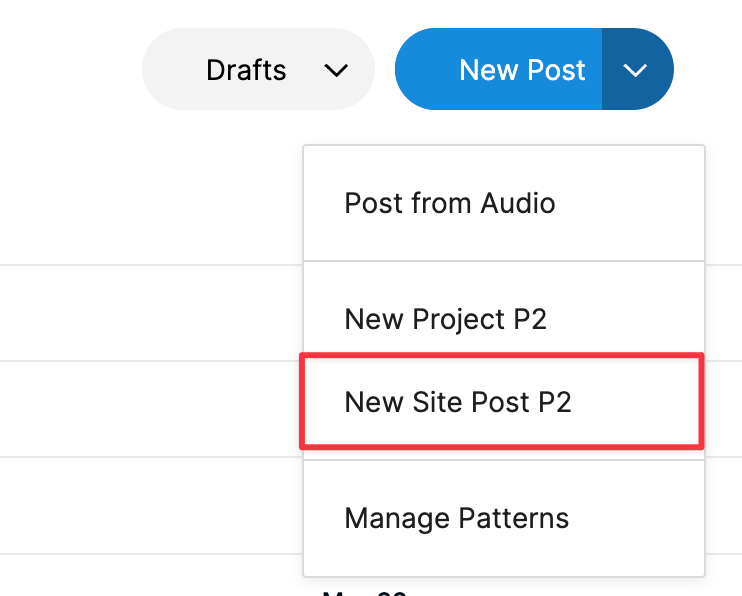
Note: If a Site Post P2 already exists, use that. Update the relevant links and leave a comment with the below information.
Our Launch Teams should be creating these posts for every new site we launch once it’s ready for handover to the Support Team.
- Document key things to know on the project.
- ███████████████.
- ███████████████.
- Naming convention is to title the post with the domain of the site, in CamelCase.
Responsibility Bucket
The Responsibility Bucket block included in the Site Post pattern allows you to note ownership of partner communications and work from the front end. If you are ready to fully handover the launched site to support, mark the Responsibility Bucket as Support TAMs.
If you are still working through post-launch tasks with the partner—or managing a new project phase—then toggle the responsibility to Launch TAMs.
Linking to the Site Post P2
Our Support Teams will always aim to look for site posts before taking action on an incoming request, but there are a couple places where Launch Team TAMs can add links to site posts to make the process of finding the site post even easier:
- As a comment at the end of the last Zendesk thread you had with the partner.
- Our Support Team often looks at those threads for context as they’re easily accessible from the “Interaction history” section in the sidebar in Zendesk.
- As an “accepted answer” comment on the Project P2.
 Automattic Special Projects