
The Kindness.org redesign needed a homepage that tells a story as you scroll. Four scenes, each with its own full-screen video background, that fade into one another as the visitor moves down the page. “The World Needs More Kindmakers” comes to life with a video that starts on scrolling. Continue down and it dissolves into “The Power of One.” Then, “Together, We Create the Ripple.” Finally, a call to action.
That kind of scroll-driven narrative (sometimes called “scrollytelling”) usually means custom JavaScript, a page builder, or handing the whole thing off to a front-end developer. We didn’t want any of that. We wanted the editorial team at Kindness.org to build and update this experience themselves, using blocks they already know.
So we built Cover Background Crossfade.
A block style, not a new block
The plugin doesn’t add a new block. It registers a block style called “Crossfade Background” on the core cover block. Apply it to two or more covers on a page, and their backgrounds go full-screen, crossfading based on scroll position. The inner content (headings, text, buttons) scrolls normally on top.
A deliberate choice. The cover block already handles background images, videos, overlay colors, and inner content. No need to reinvent that. We just needed the transition behavior.
On Kindness.org, the setup is four cover blocks in a row, each with a VideoPress video as its background. The editorial team writes the headlines and swaps the videos whenever they want. No code involved.
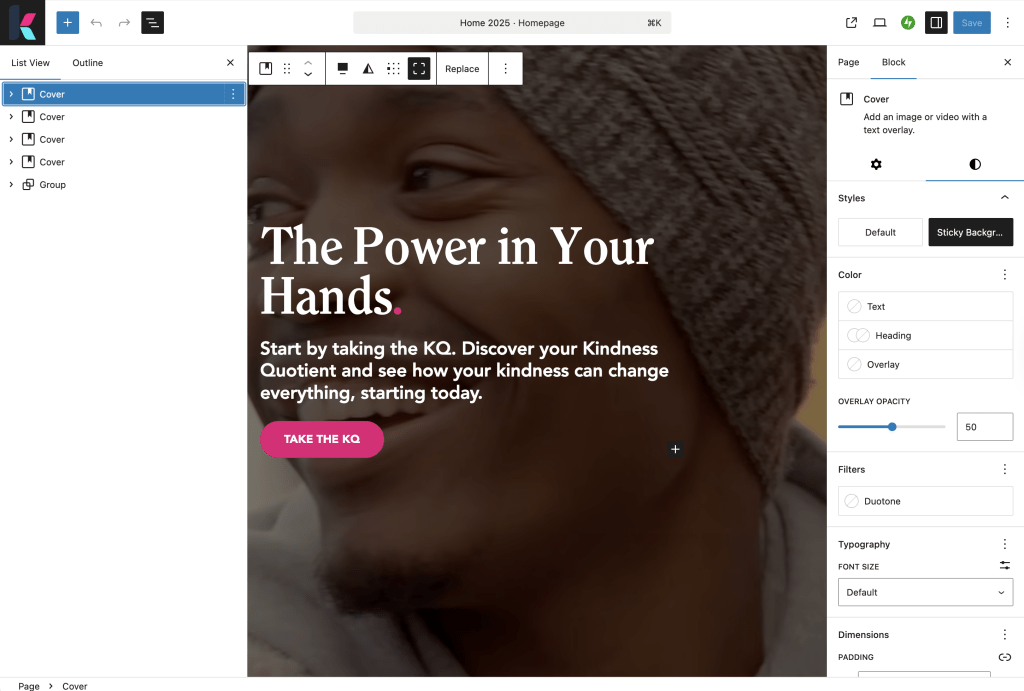
How to set it up
- Add at least two cover blocks to a page, each with a background image or video.
- Select the Crossfade Background style from the Styles panel in the block sidebar.
- Add your inner content (headings, paragraphs, buttons, whatever you need).
- Preview and scroll.
That’s the whole workflow. You can mix images and videos in the same sequence. Two covers, ten covers, it doesn’t matter. That said, even a single cover with the style applied has a useful side effect: a full-screen fixed background with no extra markup, which can work well depending on your design needs.
The background visibility gotcha
One thing that tripped us up during the Kindness.org build, and will probably trip you up too: the crossfading backgrounds sit behind everything on the page. They show through the header, the footer, and any content area without its own background color.
This is by design (the backgrounds need to be full-screen and fixed-position to crossfade properly), but it means you need to think about what comes before and after the crossfade section.
The fix: add background colors to your header and footer template parts. If you have a content section below the cover blocks, wrap it in a Group block with a background color. On Kindness.org, the sections below the hero (programs, KQ quiz, podcast) all have solid backgrounds that sit cleanly on top of the crossfade area.
Where this works well
The Kindness.org homepage is the obvious example: a nonprofit telling its story through four scenes that dissolve into each other. But the pattern fits any situation where you want visual variety tied to scroll position.
Portfolio sites. Product launch pages. Long-form storytelling. Annual reports.
Get it
Cover Background Crossfade is free and open source, like everything we ship.
- Tools page for installation and FAQ
- Source code on GitHub
- Kindness.org to see it live
Questions or feedback? Open an issue on GitHub — that’s the best place to report bugs, suggest improvements, or let us know how you’re using it.
 Automattic Special Projects