

Cover Background Crossfade adds scroll-driven crossfade transitions between cover block backgrounds. Stack multiple cover blocks on a page, apply the “Crossfade Background” block style, and each background image or video fills the screen, fading into view as the user scrolls to it. No custom code, no page builder, just the blocks you already know.
Features
- Scroll-based crossfade transitions between cover block backgrounds
- Works with both images and videos as cover backgrounds
- Full-screen background display for each cover block
- Uses a block style variation, so the original cover block behavior is preserved
- Works with as many cover blocks as you need on a single page
- No JavaScript configuration required; it works out of the box
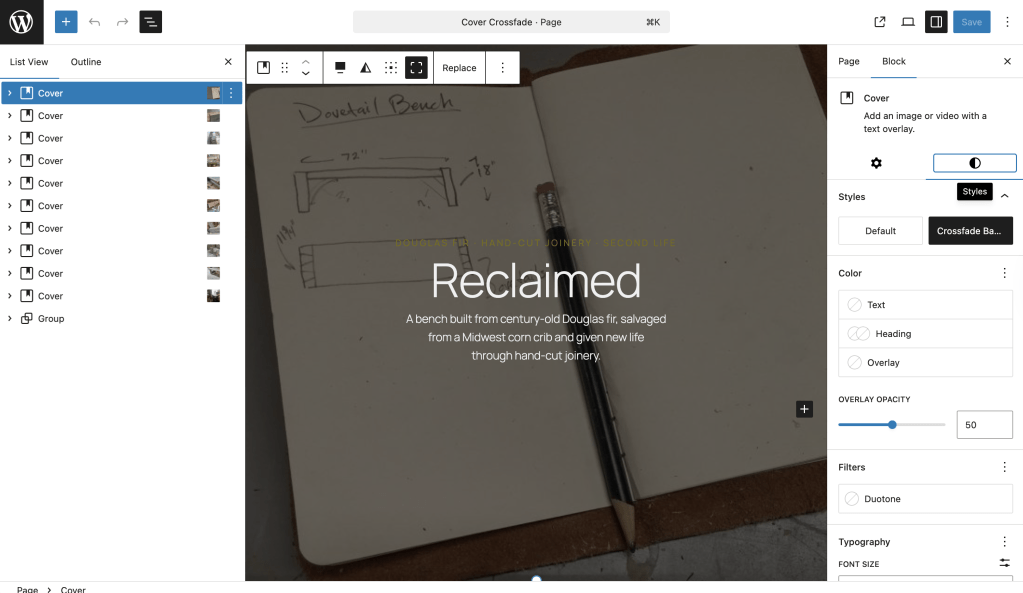
How to use it
- Edit any post or page and add at least two cover blocks.
- For each cover block, add a background image or video.
- Select the Crossfade Background style from the Styles panel in the block sidebar.
- Add your inner content (headings, buttons, text) inside each cover block.
- Preview and scroll.
A couple things to keep in mind:
- Backgrounds are always full-screen and visible behind the header, footer, and any containers without a background color. Add background colors to your header and footer template parts to keep them readable.
- To add content below the crossfade section, wrap it in a Group block with a background color. Set it to full width if you want it to fully cover the backgrounds behind it.
Frequently asked questions
How do I apply the crossfade effect?
Select any cover block, open the Styles panel in the block sidebar, and choose “Crossfade Background.” Any cover block with this style applied will participate in the scroll-based crossfade.
Can I mix images and videos?
Yes. Each cover block can use either a background image or a background video. They’ll crossfade between each other regardless of media type.
The backgrounds are showing through my header/footer. How do I fix that?
The cover backgrounds sit behind all content by design. Add a background color to your header and footer template parts so they cover the crossfading backgrounds. If you have content after the cover blocks section, wrap the covers in a Group block and add a background color to whatever follows.
Can I use this with content between the cover blocks?
Yes. The inner content of each cover block displays normally on top of the crossfading backgrounds. Just be aware that any parent container with a background color will obscure the effect.
Does this work with the Site Editor?
Yes. You can use this in posts, pages, and templates edited in the Site Editor.
What happens if I only apply the style to one cover block?
It’ll display as a full-screen fixed background for that block. The crossfade effect requires at least two cover blocks with the style applied.
 Automattic Special Projects